FileLocator Pro has been developed by British company Mythicsoft since 1999 and has been considered one of the most powerful professional file search tools for Windows for over 25 years. The tool is used by companies, government agencies, and IT professionals worldwide and costs around $80 for a single license. A somewhat stripped-down, free version is offered under the name Agent Ransack.
FileLocator Pro handles searches in compressed archives, email attachments, and offers OCR for scanned PDFs—just like FINDIT 6. Additionally, FileLocator Pro can create an index to speed up searches. In short: FileLocator Pro is an established, respected market leader in the professional segment. This makes a fair comparison on equal footing possible.
The Test Setup
Both programs received exactly the same task:
- Search Path: D:\Archive with nearly 50 GB, 50,000 files.
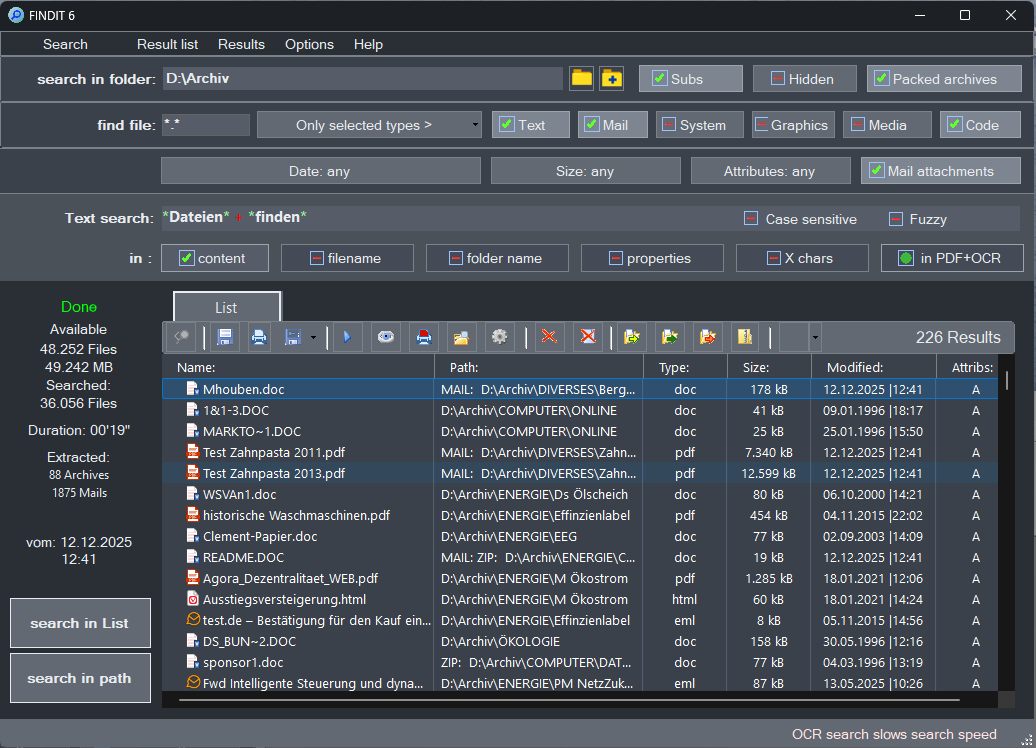
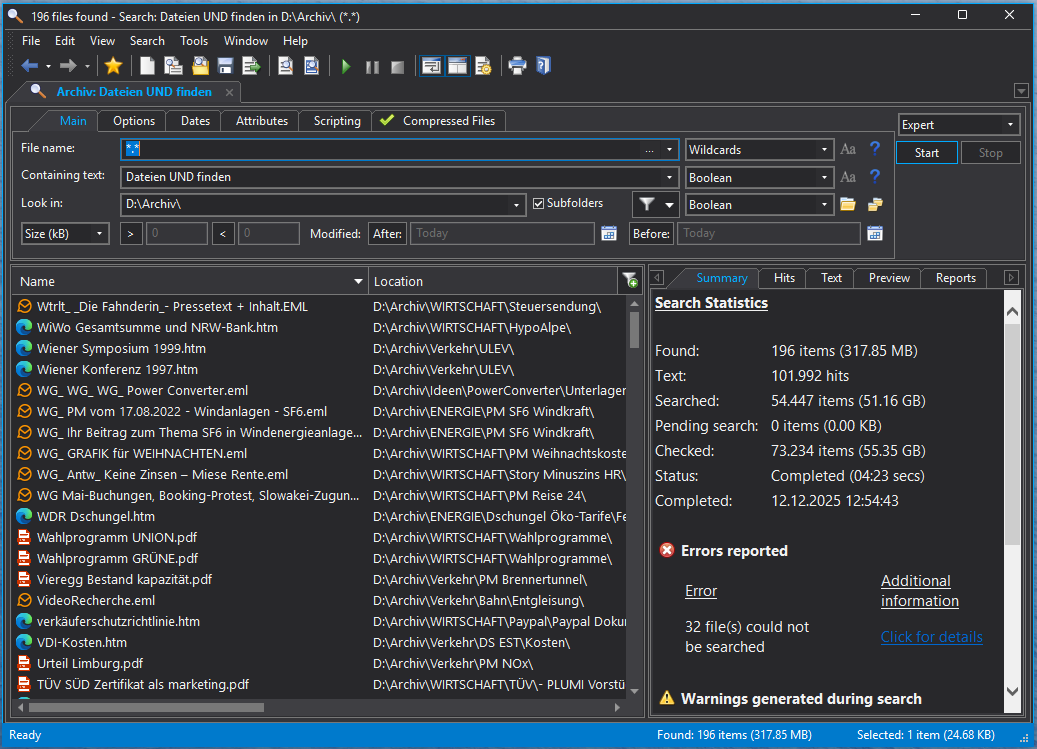
- Search Terms: "files" AND "find"
- FileLocator generally searches word components by default, would also see "find" in "finding". Accordingly, the search words in Findit were defined as *files* and *find* for this test.
- Options: Full-text search in all subfolders, all file types except binary files, including Office documents, PDFs with OCR, compressed archives, and email attachments
- System: Mid-range PC with AMD Ryzen 6-core processor, SSD
The search was conducted in a real data archive from a journalist's office that has grown over 30 years. Both programs were operated with the default settings specified by the respective manufacturer upon installation. Only the search parameters shown in the screenshots were adjusted. Additionally, the cache present in FileLocator was activated for acceleration. All search runs were repeated multiple times—the results varied by only a few percent and are reproducible at any time.
Result: FINDIT 6
🏆 FINDIT 6
Result: FileLocator Pro – Without Index
FileLocator Pro – Without Index
The Analysis
faster
FINDIT 6 accomplishes in 19 seconds what takes FileLocator Pro over 4 minutes.
More Hits, Not Fewer
FINDIT 6 finds more relevant files with 226 hits than FileLocator Pro with 198—and does so in a fraction of the time. The higher speed thus doesn't come at the expense of thoroughness. The screenshot even shows a hit in a zipped email attachment—FINDIT really searches everything.
But Wouldn't FileLocator Be Faster With an Index?
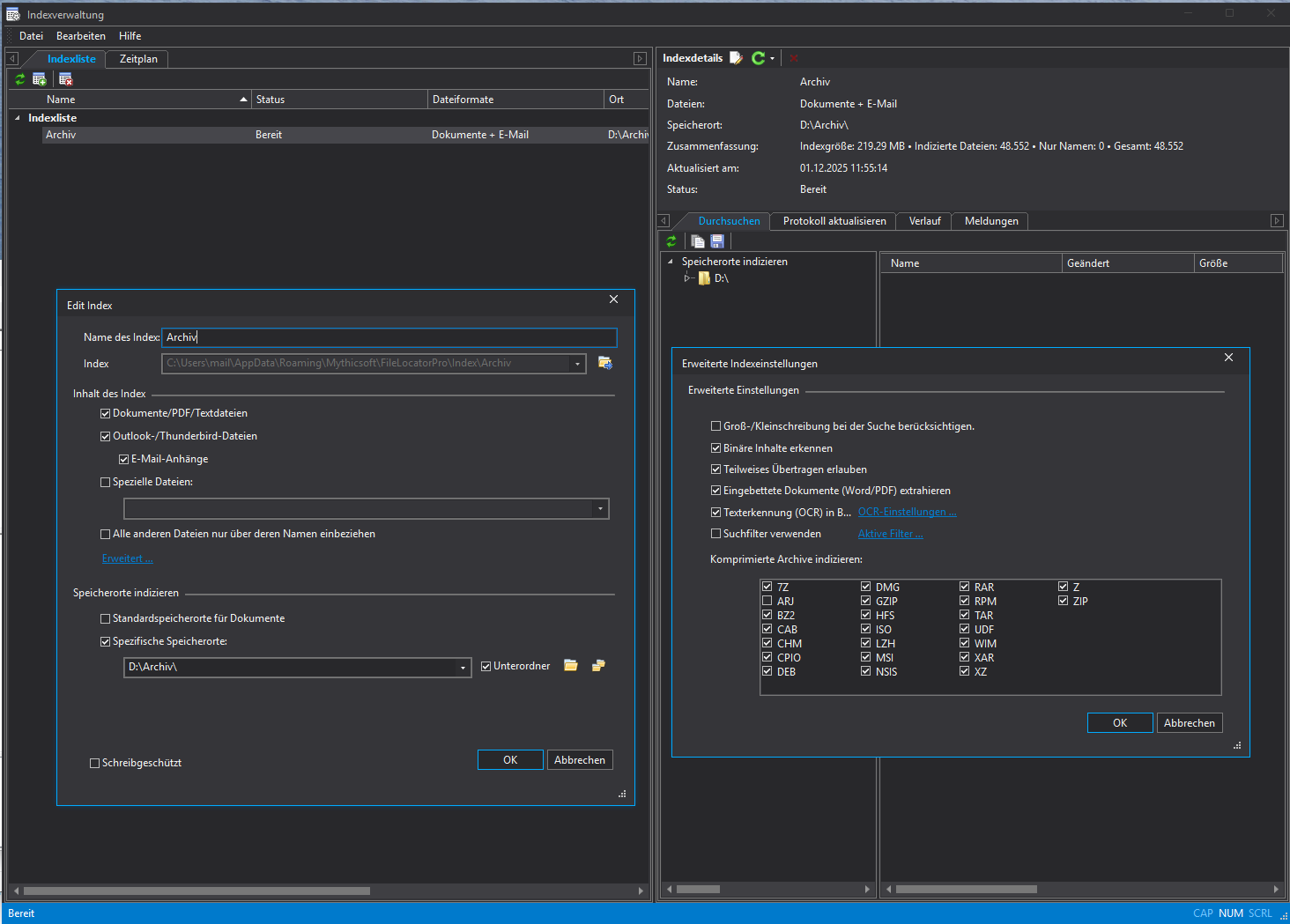
FileLocator Pro offers the option to create an index. We created the index with all available options: Office documents, PDFs, OCR for scanned documents, compressed archives, and email attachments. Truly the maximum coverage of file formats possible with FileLocator's index.
FileLocator Pro – With Index (All Options Enabled)
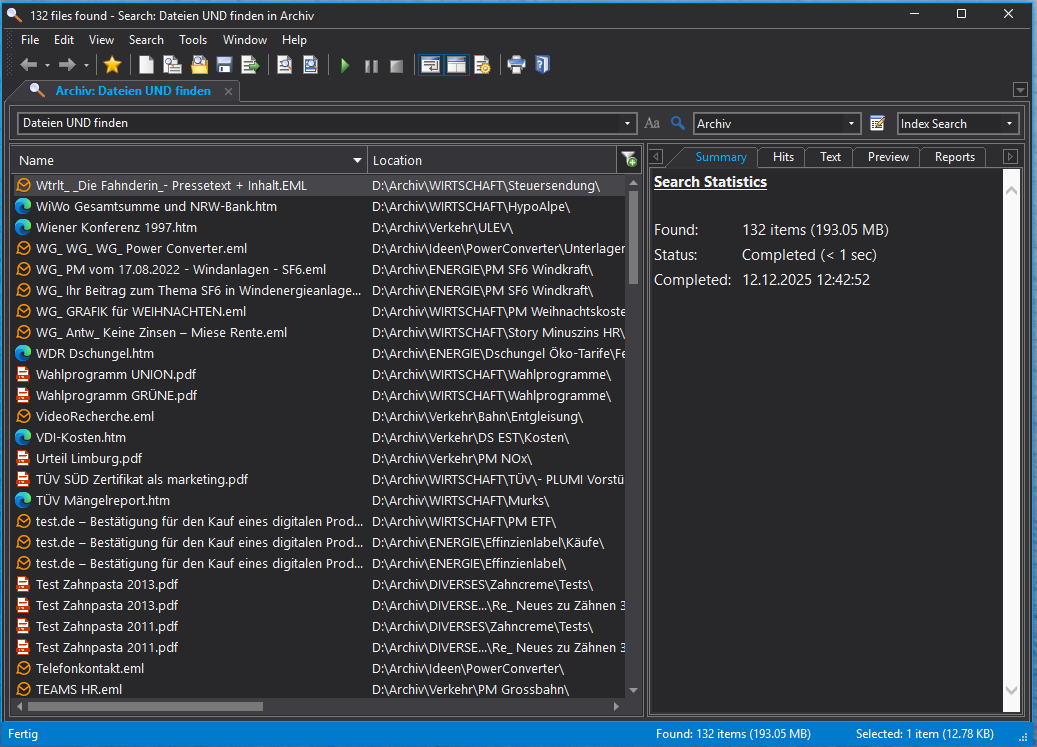
Yes, with an index FileLocator Pro is lightning fast—under one second. But: The index finds only 132 hits instead of 226. That's just 59% of the actually present files. And that after over 51 minutes of index creation. And we really used all indexing options that FileLocator offers!
19 seconds for complete results are better than 0 seconds for incomplete ones.
Overview
| Method | Search Duration | Hits | Preparation |
|---|---|---|---|
| FINDIT 6 | 19 sec. | 226 | None |
| FileLocator Pro | 4:17 min. | 196 | None |
| FileLocator Pro (with index) | <1 sec. | 132 | 51 min. + 219 MB |
Conclusion
The time difference between FileLocator Pro with and without an index is enormous—exactly as one would expect when comparing direct file search with index systems. However, the test also clearly shows: Direct search delivers more complete results.
The Best of Both Worlds
FINDIT 6 not only delivers more hits than both FileLocator variants—but above all so quickly that the time difference from an index becomes largely irrelevant.
19 seconds instead of over 4 minutes. Complete results without preparation. No index, no compromises.
This is the result of 30 years of continuous development, combined with the revolutionary optimizations of 2025: adaptive multithreading that doesn't work by the textbook, but according to the principle of maximum efficiency.
You can test it yourself. FINDIT 6 is free and fully functional for 30 days. Make your own comparison—with your data, on your system.